DWGStats is a native ObjectARX plugin for AutoCAD and Civil 3D that records how much time is actually spent working in each drawing and turns the logs into Excel reports — per drawing, per project, per day, and across the full history.
Minutes are counted only while you are actually working: idle periods past a configurable threshold are dropped, and sessions crossing midnight are split into the correct calendar days. Report totals can be grouped by drawing, by folder, or by a project number extracted from the file path with a configurable pattern (for example, a path ending in "26143 - Site\26143-GR01.dwg" is grouped under project 26143).
Logs produced by the original tool by Alexander Rivilis , whose work this plugin is based on.
Reports
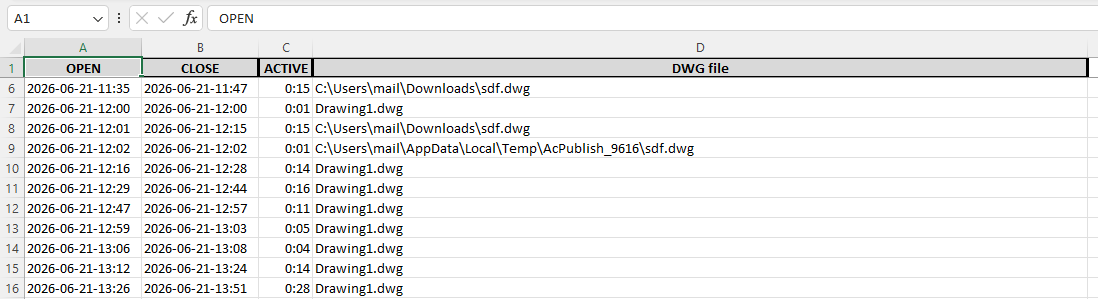
- Daily (.xlsx per day) — session table with open/close times, per-project summary, and a pie chart that folds unreadably small slices into "Other".
- Lifetime summary — one workbook with totals and charts by project, year, and month; a GitHub-style calendar heatmap (hover any day for the exact time); daily detail; and a NightOwl sheet of every late finish on record.
Commands
- DWGSTATMERGE generates the time report (.xlsx) for the last month and opens it.
- DWGSTATMERGEALL generates the time report across the full history.
- DWGSTATSUMMARY generates the lifetime summary workbook with charts and the heatmap.
- DWGSTATSCONFIG configures everything in one place: log folder, idle threshold, grouping mode, and the project-number pattern.
- DWGSTATSABOUT shows version and credits.
Installation
Load the .arx module with the APPLOAD command. Select the build that matches your product:
- AutoCAD / Civil 3D 2024: DWGStats2024.arx
- AutoCAD / Civil 3D 2025 and 2026: DWGStats2025.arx
- AutoCAD / Civil 3D 2027: DWGStats2027.arx
Downloads
- DWGStats for 2027 (DWGStats2027.arx)
- DWGStats for 2025 / 2026 (DWGStats2025.arx)
- DWGStats for 2024 (DWGStats2024.arx)
Built by Ilia Chernitsky.