When working on hydrology and site design projects, converting square feet to acres is something that comes up constantly. Even though the math is simple, repeating it dozens of times a day quickly becomes a distraction.
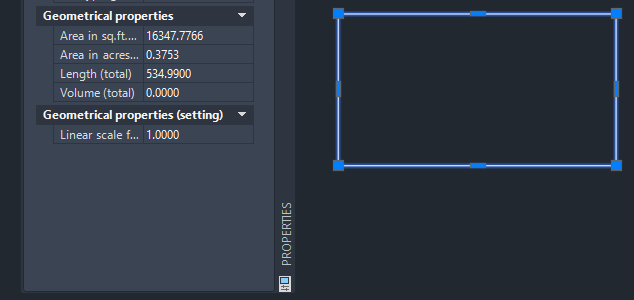
This small ARX utility was created to remove that friction by displaying area values in acres directly inside the Civil 3D Properties palette.
What the tool does
Once loaded, the utility adds an additional read-only field to the Geometrical Properties section:
- Displays object area in acres alongside square feet
- Works with closed polylines, hatches, and similar objects
- Values can be selected and copied directly for reports
- Automatically loads on startup
For hydrology calculations, this makes it much easier to move data straight into reports or spreadsheets without manual conversions.
How it looks
Below is an example of how the additional area field appears in the Properties palette:
Versions and compatibility
Due to changes in Civil 3D internals, separate builds are required for different releases.
Available downloads:
The correct version should be loaded depending on the AutoCAD / Civil 3D release being used.
Background
This utility is based on an existing ARX tool that had not previously been used in this particular way.
The idea to adapt it for displaying areas in acres directly in the Properties palette came from my day-to-day production needs, and I commissioned the modification specifically for this workflow.
The original author of the program and the developer who carried out the customization and implementation is Alexander Rivilis, ensuring reliability and compatibility across Civil 3D versions.
Closing thoughts
This is a simple tool, but in practice it saves time every single day. If you regularly work with areas in acres especially in hydrology or site design this kind of small automation can add up quickly.